http://www.jeffrin.in/wp-content/uploads/2010/05/frto-ccr.pdf
Forward RTO-Recovery (F-RTO) defined in RFC4138
$cat /proc/sys/net/ipv4/tcp_frto 2 $
Enables Forward RTO-Recovery (F-RTO) defined in RFC4138.
F-RTO is an enhanced recovery algorithm for TCP retransmission
timeouts. It is particularly beneficial in wireless environments
where packet loss is typically due to random radio interference
rather than intermediate router congestion. F-RTO is sender-side
only modification. Therefore it does not require any support from
the peer.
If set to 1, basic version is enabled. 2 enables SACK enhanced
F-RTO if flow uses SACK. The basic version can be used also when
SACK is in use though scenario(s) with it exists where F-RTO
interacts badly with the packet counting of the SACK enabled TCP
flow.
source: linux kernel documentation.
Existing loss recovery techniques are not effective in dealing with packet losses and new techniques must be developed to handle them. Almost 50% of all losses required a coarse timeout to recover. Fast retransmissions recovered from less than 45% of all losses. The remainder of losses were during slow start following a timeout. Future network implementations should increase their default socket buffer size to avoid the receiver window from becoming a bottleneck. The socket buffer size limited the throughput of approximately 14% of all observed connections. A client using a collection of parallel connections between a client and server is a more aggressive user of the network than an application that uses a single TCP connection. Throughput is positively correlated with the number of active connections. When multiple connections are concurrently active and one of them experiences a loss, only half of the remaining ones on average experience a loss. The combined congestion window of a group of parallel connections does not decrease as much as the congestion window of a single connection after a loss epoch. Of a group of parallel connections, ones with small outstanding windows could experience a larger number of losses than their share of the total outstanding window would warrant. This means that it may be harder to initiate a new connection than to keep an existing connection going. source : TCP Behavior of a Busy Internet Server: Analysis and Improvements Hari Balakrishnan*, Venkata N. Padmanabhan*, Srinivasan Seshan+, Mark Stemm*, Randy H. Katz*
code fragments.
/* Abort F-RTO algorithm if one is in progress */
tp->frto_counter = 0;
/* Do not perform any recovery during F-RTO algorithm */
if (tp->frto_counter)
return 0;
/* F-RTO spurious RTO detection algorithm (RFC4138)
*
* F-RTO affects during two new ACKs following RTO (well, almost, see inline
* comments). State (ACK number) is kept in frto_counter. When ACK advances
* window (but not to or beyond highest sequence sent before RTO):
* On First ACK, send two new segments out.
* On Second ACK, RTO was likely spurious. Do spurious response (response
* algorithm is not part of the F-RTO detection algorithm
* given in RFC4138 but can be selected separately).
* Otherwise (basically on duplicate ACK), RTO was (likely) caused by a loss
* and TCP falls back to conventional RTO recovery. F-RTO allows overriding
* of Nagle, this is done using frto_counter states 2 and 3, when a new data
* segment of any size sent during F-RTO, state 2 is upgraded to 3.
*
* Rationale: if the RTO was spurious, new ACKs should arrive from the
* original window even after we transmit two new data segments.
*
* SACK version:
* on first step, wait until first cumulative ACK arrives, then move to
* the second step. In second step, the next ACK decides.
*
* F-RTO is implemented (mainly) in four functions:
* - tcp_use_frto() is used to determine if TCP is can use F-RTO
* - tcp_enter_frto() prepares TCP state on RTO if F-RTO is used, it is
* called when tcp_use_frto() showed green light
* - tcp_process_frto() handles incoming ACKs during F-RTO algorithm
* - tcp_enter_frto_loss() is called if there is not enough evidence
* to prove that the RTO is indeed spurious. It transfers the control
* from F-RTO to the conventional RTO recovery
*/
source: linux kernel sources. tcp_input.c
grep … no matching data -I
$grep -r deactivates * grep: trash4: No such file or directory grep: warning: X11/X11: recursive directory loop Binary file X11/zile matches grep: X11/trash4: No such file or directory Binary file zile matches $grep -I -r deactivates * grep: trash4: No such file or directory grep: warning: X11/X11: recursive directory loop grep: X11/trash4: No such file or directory ahiliation:~$pwd /usr/bin $
-I option
Process a binary file as if it did not contain matching data; this is equivalent to the –binary-files=without-match option.
source : debian manual for grep.
how long to keep sockets in the state FIN-WAIT-2
$cat /proc/sys/net/ipv4/tcp_fin_timeout 60 $
The tcp_fin_timeout variable tells kernel how long to keep sockets in the state FIN-WAIT-2 if you were the one closing the socket. This is used if the other peer is broken for some reason and don’t close its side, or the other peer may even crash unexpectedly. Each socket left in memory takes approximately 1.5Kb of memory, and hence this may eat a lot of memory if you have a moderate webserver or something alike.
This value takes an integer value which is per default set to 60 seconds. This used to be 180 seconds in 2.2 kernels, but was reduced due to the problems mentioned above with webservers and problems that arose from getting huge amounts of connections.
Copyright © 2002 by Oskar Andreasson Under GNU FDL
FIN_WAIT2 Connection is closed, and the socket is waiting for a shutdown from the remote end.
linux/include/net/tcp.h
55: * close the socket, about 60 seconds */
56: #define TCP_FIN_TIMEOUT (3*60*HZ) /* BSD style FIN_WAIT2 deadlock breaker */
57: #define TCP_ACK_TIME (3*HZ) /* time to delay before sending an ACK */
kernel.osuosl.org/pub/linux/kernel/v1.3/linux-1.3.87.tar.bz2 - GPL - C -
grep -Z
from grep manual in debian.
Output a zero byte (the ASCII NUL character) instead of the character that normally follows a file name
$grep -Z FACK *
proc.c SNMP_MIB_ITEM("TCPFACKReorder", LINUX_MIB_TCPFACKREORDER),
sysctl_net_ipv4.c .ctl_name = NET_TCP_FACK,
tcp_input.c * Packet counting of FACK is based on in-order assumptions, therefore TCP
tcp_input.c mib_idx = LINUX_MIB_TCPFACKREORDER;
tcp_input.c * A''. Its FACK modfication, head until snd.fack is lost.
tcp_input.c * Event "C". Later note: FACK people cheated me again 8), we have to account
tcp_input.c * Whether FACK should check here for tp->reordering segs
tcp_input.c * Instead, with FACK TCP uses fackets_out that includes both SACKed
tcp_input.c/* Linux NewReno/SACK/FACK/ECN state machine.
tcp_input.c * FACK: It is the simplest heuristics. As soon as we decided
tcp_input.c * takes place. We use FACK by default until reordering
tcp_output.c * based retransmit packet might feed us FACK information again.
tcp_vegas.c * using fine-grained timers, NewReno, and FACK.
$grep FACK *
proc.c: SNMP_MIB_ITEM("TCPFACKReorder", LINUX_MIB_TCPFACKREORDER),
sysctl_net_ipv4.c: .ctl_name = NET_TCP_FACK,
tcp_input.c: * Packet counting of FACK is based on in-order assumptions, therefore TCP
tcp_input.c: mib_idx = LINUX_MIB_TCPFACKREORDER;
tcp_input.c: * A''. Its FACK modfication, head until snd.fack is lost.
tcp_input.c: * Event "C". Later note: FACK people cheated me again 8), we have to account
tcp_input.c: * Whether FACK should check here for tp->reordering segs
tcp_input.c: * Instead, with FACK TCP uses fackets_out that includes both SACKed
tcp_input.c:/* Linux NewReno/SACK/FACK/ECN state machine.
tcp_input.c: * FACK: It is the simplest heuristics. As soon as we decided
tcp_input.c: * takes place. We use FACK by default until reordering
tcp_output.c: * based retransmit packet might feed us FACK information again.
tcp_vegas.c: * using fine-grained timers, NewReno, and FACK.
$
Enable FACK congestion avoidance
$cat /proc/sys/net/ipv4/tcp_fack 1 $
tcp_fack Enable FACK congestion avoidance and fast retransmission. The value is not used, if tcp_sack is not enabled.
http://www.psc.edu/networking/ftp/papers/Fack.9608.ps
grepping through the linux kernel source 2.6.32
proc.c:210: SNMP_MIB_ITEM("TCPFACKReorder", LINUX_MIB_TCPFACKREORDER),
sysctl_net_ipv4.c:475: .procname = "tcp_fack",
tcp_input.c:847: * Packet counting of FACK is based on in-order assumptions, therefore TCP
tcp_input.c:1029: * A''. Its FACK modfication, head until snd.fack is lost.
tcp_minisocks.c:412: newtp->fackets_out = 0;
tcp_vegas.c:16: * using fine-grained timers, NewReno, and FACK.
tcp_output.c:762:/* When a modification to fackets out becomes necessary, we need to check
tcp_output.c:763: * skb is counted to fackets_out or not.
explicit congestion notification
$cat /proc/sys/net/ipv4/tcp_ecn 2 $
The tcp_ecn variable turns on Explicit Congestion Notification in TCP connections. This is used to automatically tell the host when there are congestions in a route to a specific host or a network. This can be used to throttle the transmitters to send packets in a slower rate over that specific router or firewall.
The tcp_ecn variable takes a boolean value and is per default set to 0, or turned off. If you want to turn this on in your kernel, you should set this variable to 1.
text under GNU FDL
Date: Fri, 8 May 1998 13:54:39 -0400 (EDT)
From: "Jamal Hadi Salim"
To: ecn-interest@research.att.com
Subject: tcpdump patch to print ECN info
Message-ID:
against 3.4a5; feel free to change the output
-----------------------------
diff -ru tcpdump-3.4a5-orig/print-ip.c tcpdump-3.4a5/print-ip.c
--- tcpdump-3.4a5-orig/print-ip.c Fri May 8 13:42:02 1998
+++ tcpdump-3.4a5/print-ip.c Fri May 8 13:03:45 1998
@@ -490,7 +490,14 @@
(void)printf(" (DF)");
if (ip->ip_tos)
+ {
(void)printf(" [tos 0x%x]", (int)ip->ip_tos);
+ /* ECN bits */
+ if (ip->ip_tos &0x01)
+ (void)printf(" [CE] ");
+ if (ip->ip_tos &0x02)
+ (void)printf(" [ECT] ");
+ }
if (ip->ip_ttl ip_ttl);
diff -ru tcpdump-3.4a5-orig/print-tcp.c tcpdump-3.4a5/print-tcp.c
--- tcpdump-3.4a5-orig/print-tcp.c Fri May 8 13:42:02 1998
+++ tcpdump-3.4a5/print-tcp.c Fri May 8 13:32:06 1998
@@ -75,6 +75,7 @@
#define TCPOPT_CCECHO 13 /* T/TCP CC options (rfc1644) */
#endif
+#define ECE_ON 0x40 /* ECN notify */
struct tha {
struct in_addr src;
struct in_addr dst;
@@ -143,6 +144,9 @@
putchar('P');
} else
putchar('.');
+ flags = tp->th_flags;
+ if (flags & ECE_ON)
+ printf(" [TCP-ECE]");
if (!Sflag && (flags & TH_ACK)) {
register struct tcp_seq_hash *th;
--------------------------------------------------
cheers,
jamal
Computing Technology Labs, Nortel
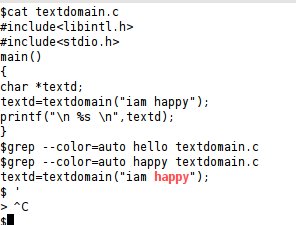
grep –color
grep options and fgrep
$grep -V GNU grep 2.6.3 Copyright (C) 2009 Free Software Foundation, Inc. License GPLv3+: GNU GPL version 3 or later This is free software: you are free to change and redistribute it. There is NO WARRANTY, to the extent permitted by law. $
GREP -F or fgrep $grep -F H hello.txt Hello $grep -F helloKello hello.txt $grep -F helloello hello.txt $grep -F hell hello.txt hello helloo hello $time grep -F hell hello.txt hello helloo hello real 0m0.009s user 0m0.000s sys 0m0.008s $time grep hell hello.txt hello helloo hello real 0m0.009s user 0m0.004s sys 0m0.004s $
grep -n ,-v , -c, -i
$grep -n root /etc/passwd 1:root:x:0:0:root:/root:/bin/bash $ $cat hello.txt hello world $grep -v hello hello.txt world $ $cat hello.txt hello world helloo $grep -c hello hello.txt 2 $grep -c helloo hello.txt 1 $ $cat hello.txt hello world helloo Hello $grep hello hello.txt hello helloo $grep -i hello hello.txt hello helloo Hello $
