
Print the prime factors of each specified integer NUMBER.
Prime factor
vim delete command
: d 5
deletes five lines from the current cursor position.
Vim Editor
hello.php

prints out “happy hacking” using web browser.
pidof — find the process ID of a running program
$man pidof
$pidof chromium
2551 2495 2398 1680 1558 1534 1530 1517
$pidof gnome-terminal
$pidof pidof
2567
$pidof gnome-session
$pidof gdm3
714
$pidof gdbus
$pidof gpm
709
$pidof systemd
1123
$pidof agetty
665
$
pidof

Pidof finds the process id’s (pids) of the named programs
hash

i think i did not find typical manpages for “hash”
nc – tcp/ip swiss army knife
ABOUT nc
Netcat (often abbreviated to nc) is a computer networking utility for reading from and writing to network connections using TCP or UDP. Netcat is designed to be a dependable back-end that can be used directly or easily driven by other programs and scripts. At the same time, it is a feature-rich network debugging and investigation tool, since it can produce almost any kind of connection its user could need and has a number of built-in capabilities.
TYPICAL COMMANDLINE RELATED
[text]
Window I Server
$nc -l -p 3333
hello
hello
how are you ?
fine
Window II client
$nc 127.0.0.1 3333
hello
hello
how are you ?
fine
[/text]
Related Source Code Exposition
[text]
doexec (fd)
int fd;
{
register char * p;
dup2 (fd, 0); /* the precise order of fiddlage */
close (fd); /* is apparently crucial; this is */
dup2 (0, 1); /* swiped directly out of "inetd". */
if (doexec_use_sh) {
Debug (("gonna exec "%s" using /bin/sh…", pr00gie))
execl ("/bin/sh", "sh", "-c", pr00gie, NULL);
bail ("exec %s failed", pr00gie); /* this gets sent out. Hmm… */
}
p = strrchr (pr00gie, ‘/’); /* shorter argv[0] */
if (p)
p++;
else
p = pr00gie;
Debug (("gonna exec %s as %s…", pr00gie, p))
execl (pr00gie, p, NULL);
bail ("exec %s failed", pr00gie); /* this gets sent out. Hmm… */
} /* doexec */
[/text]
Source Code Highlight
fiddle all  the file descriptors around, and  hand off to another prog.  Sort of like a one-off "poor man's inetd". This is the only section of code that would be security-critical, which  is
why  it's ifdefed  out  by default.  Use at your own hairy risk; if you leave shells lying around
behind open listening ports  you deserve to lose!!
Related Knowledge
It has been suggested  that the open() system call should get   a  flag   which  would   cause  it   to
select  a non-sequential   file   descriptor   from   the   outset, eliminating   the   need   for   a
separate   call   to nonseqfd(). There are, however,  a number of system calls which  create file
descriptors but  which have  no flags parameter and  which, thus, will never be  able to return
non-sequential  file descriptors;  socket() is  a classic example. So there will still  be a need for a
system call which can duplicate a file descriptor into the new space.
LINKS
http://lwn.net/Articles/236843/
http://www.g-loaded.eu/2006/11/06/netcat-a-couple-of-useful-examples/
nc – TCP/IP swiss army knife
A UNIX Command
-
Window I Server
-
Window II client
UNIX Explanation
netcat is a simple unix utility which reads and writes data
across network connections, using TCP or UDP protocol.
Related Source Code Exposition
doexec (fd)
  int fd;
{
  register char * p;

  dup2 (fd, 0);                         /* the precise order of fiddlage */
  close (fd);                           /* is apparently crucial; this is */
  dup2 (0, 1);                          /* swiped directly out of "inetd". */

  if (doexec_use_sh) {
Debug (("gonna exec \"%s\" using /bin/sh...", pr00gie))
    execl ("/bin/sh", "sh", "-c", pr00gie, NULL);
    bail ("exec %s failed", pr00gie);   /* this gets sent out.  Hmm... */
  }

  p = strrchr (pr00gie, '/');           /* shorter argv[0] */
  if (p)
    p++;
  else
    p = pr00gie;
Debug (("gonna exec %s as %s...", pr00gie, p))
  execl (pr00gie, p, NULL);
  bail ("exec %s failed", pr00gie);     /* this gets sent out.  Hmm... */
} /* doexec */
Source Code Highlight
fiddle all  the file descriptors around, and  hand off to
another prog.  Sort of like a one-off "poor man's inetd".
This  is   the  only  section  of  code   that  would  be
security-critical,  which  is  why  it's ifdefed  out  by
default.  Use at your own hairy risk; if you leave shells
lying around  behind open listening ports  you deserve to
lose!!
Featured Image
Related Knowledge
It has been suggested  that the open() system call should
get   a  flag   which  would   cause  it   to   select  a
non-sequential   file   descriptor   from   the   outset,
eliminating   the   need   for   a   separate   call   to
nonseqfd(). There are, however,  a number of system calls
which  create file  descriptors but  which have  no flags
parameter and  which, thus, will never be  able to return
non-sequential  file descriptors;  socket() is  a classic
example. So there will still  be a need for a system call
which can duplicate a file descriptor into the new space.

source : http://lwn.net/Articles/236843/
nc

netcat is a simple unix utility which reads and writes data
across network connections, using TCP or UDP protocol.
netcat examples
free – Display amount of free and used memory in the system
A UNIX Command
$free
             total       used       free     shared    buffers     cached
Mem:        507008     432908      74100          0      14700     186816
-/+ buffers/cache:     231392     275616
Swap:      1485972          0    1485972
$free -m
             total       used       free     shared    buffers     cached
Mem:           495        422         72          0         14        182
-/+ buffers/cache:        225        269
Swap:         1451          0       1451
$
UNIX Explanation
Display amount of free and used memory in the system.
Related Source Code Exposition
#define S(X) ( ((unsigned long long)(X) <> shift)
const char help_message[] =
"usage: free [-b|-k|-m|-g] [-l] [-o] [-t] [-s delay] [-c count] [-V]\n"
" -b,-k,-m,-g show output in bytes, KB, MB, or GB\n"
" -l show detailed low and high memory statistics\n"
" -o use old format (no -/+buffers/cache line)\n"
" -t display total for RAM + swap\n"
" -s update every [delay] seconds\n"
" -c update [count] times\n"
" -V display version information and exit\n"
;
int main(int argc, char *argv[]){
int i;
int count = 0;
int shift = 10;
int pause_length = 0;
int show_high = 0;
int show_total = 0;
int old_fmt = 0;
/* check startup flags */
while( (i = getopt(argc, argv, "bkmglotc:s:V") ) != -1 )
switch (i) {
case 'b': shift = 0; break;
case 'k': shift = 10; break;
case 'm': shift = 20; break;
case 'g': shift = 30; break;
case 'l': show_high = 1; break;
case 'o': old_fmt = 1; break;
case 't': show_total = 1; break;
case 's': pause_length = 1000000 * atof(optarg); break;
case 'c': count = strtoul(optarg, NULL, 10); break;
case 'V': display_version(); exit(0);
default:
fwrite(help_message,1,strlen(help_message),stderr);
return 1;
}
do {
meminfo();
printf(" total used free shared buffers cached\n");
printf(
"%-7s %10Lu %10Lu %10Lu %10Lu %10Lu %10Lu\n", "Mem:",
S(kb_main_total),
S(kb_main_used),
S(kb_main_free),
S(kb_main_shared),
S(kb_main_buffers),
S(kb_main_cached)
);
// Print low vs. high information, if the user requested it.
// Note we check if low_total==0: if so, then this kernel does
// not export the low and high stats. Note we still want to
// print the high info, even if it is zero.
if (show_high) {
printf(
"%-7s %10Lu %10Lu %10Lu\n", "Low:",
S(kb_low_total),
S(kb_low_total - kb_low_free),
S(kb_low_free)
);
printf(
"%-7s %10Lu %10Lu %10Lu\n", "High:",
S(kb_high_total),
S(kb_high_total - kb_high_free),
S(kb_high_free)
);
}
if(!old_fmt){
unsigned KLONG buffers_plus_cached = kb_main_buffers + kb_main_cached;
printf(
"-/+ buffers/cache: %10Lu %10Lu\n",
S(kb_main_used - buffers_plus_cached),
S(kb_main_free + buffers_plus_cached)
);
}
printf(
"%-7s %10Lu %10Lu %10Lu\n", "Swap:",
S(kb_swap_total),
S(kb_swap_used),
S(kb_swap_free)
);
if(show_total){
printf(
"%-7s %10Lu %10Lu %10Lu\n", "Total:",
S(kb_main_total + kb_swap_total),
S(kb_main_used + kb_swap_used),
S(kb_main_free + kb_swap_free)
);
}
if(pause_length){
fputc('\n', stdout);
fflush(stdout);
if (count != 1) usleep(pause_length);
}
} while(pause_length && --count);
return 0;
}
Source Code Highlight
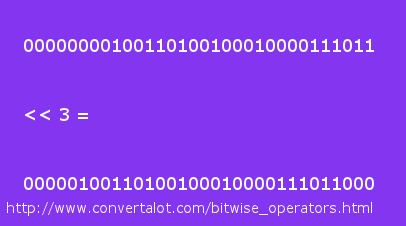
#define S(X) ( ((unsigned long long)(X) <> shift)
it  takes  a  number,  X,  casts  it  to  a  'long  long'
(presumably the  longest int type  on your system  ?) and
then it left-shifts by  10 (meaning, the the positions of
all bits are shifted 10 places to the left) only to shift
it back right 'shift' number of positions.

source : nickname - psuedonymous. server - irc.freenode.net
Featured Image
Related Knowledge
free displays the total  amount of free and used physical
and swap  memory in  the system, as  well as  the buffers
used by  the kernel.  The shared memory  column should be
ignored; it is obsolete.

source : debian manual for free.