
Display amount of free and used memory in the system.
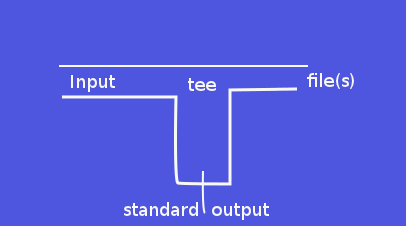
tee – read from standard input and write to standard output and files
A UNIX Command
$tee name
my name is nice.
my name is nice.
$cat name
my name is nice.
$
UNIX Explanation
Copy standard  input to each  FILE, and also  to standard
output.  A  special variant of  the tee for the  shell is
called script and  permits duplicating all input commands
submitted to a shell into a file.
Related Source Code Exposition
static bool

tee_files (int nfiles, const char **files)

{

  FILE **descriptors;

  char buffer[BUFSIZ];

  ssize_t bytes_read;

  int i;

  bool ok = true;

  char const *mode_string =

    (O_BINARY

     ? (append ? "ab" : "wb")

     : (append ? "a" : "w"));
descriptors = xnmalloc (nfiles + 1, sizeof *descriptors);
/* Move all the names `up' one in the argv array to make room for
the entry for standard output. This writes into argv[argc]. */
for (i = nfiles; i >= 1; i--)
files[i] = files[i - 1];
if (O_BINARY && ! isatty (STDIN_FILENO))
xfreopen (NULL, "rb", stdin);
if (O_BINARY && ! isatty (STDOUT_FILENO))
xfreopen (NULL, "wb", stdout);
/* In the array of NFILES + 1 descriptors, make
the first one correspond to standard output. */
descriptors[0] = stdout;
files[0] = _("standard output");
setvbuf (stdout, NULL, _IONBF, 0);
for (i = 1; i <= nfiles; i++)
{
descriptors[i] = (STREQ (files[i], "-")
? stdout
: fopen (files[i], mode_string));
if (descriptors[i] == NULL)
{
error (0, errno, "%s", files[i]);
ok = false;
}
else
setvbuf (descriptors[i], NULL, _IONBF, 0);
}
while (1)
{
bytes_read = read (0, buffer, sizeof buffer);
#ifdef EINTR
if (bytes_read < 0 && errno == EINTR)
continue;
#endif
if (bytes_read <= 0)
break;
/* Write to all NFILES + 1 descriptors.
Standard output is the first one. */
for (i = 0; i <= nfiles; i++)
if (descriptors[i]
&& fwrite (buffer, bytes_read, 1, descriptors[i]) != 1)
{
error (0, errno, "%s", files[i]);
descriptors[i] = NULL;
ok = false;
}
}
if (bytes_read == -1)
{
error (0, errno, _("read error"));
ok = false;
}
/* Close the files, but not standard output. */
for (i = 1; i <= nfiles; i++)
if (!STREQ (files[i], "-")
&& descriptors[i] && fclose (descriptors[i]) != 0)
{
error (0, errno, "%s", files[i]);
ok = false;
}
free (descriptors);
return ok;
}
Source Code Highlight
Copy the standard input into  each of the NFILES files in
FILES  and  into the  standard  output.   Return true  if
successful.
Featured Image
Related Knowledge
The  `tee'  command  copies  standard input  to  standard
output and also to any files given as arguments.  This is
useful when  you want not only  to send some  data down a
pipe, but also to save a copy.
tee

Copy standard input to each FILE, and also to standard output.
A special variant of the tee for the shell is called script and permits
duplicating all input commands submitted to a shell into a file.
stat – display file or file system status
A UNIX Command stat -f /
$stat -f /
  File: "/"
    ID: bc427fdafb7b0541 Namelen: 255     Type: ext2/ext3
Block size: 4096       Fundamental block size: 4096
Blocks: Total: 18864769   Free: 16209639   Available: 15251363
Inodes: Total: 4792320    Free: 4684854
$
UNIX Explanation
Display file or file system status.
Related Source Code Exposition
static bool

do_statfs (char const *filename, bool terse, char const *format)

{

  STRUCT_STATVFS statfsbuf;
if (STATFS (filename, &statfsbuf) != 0)
{
error (0, errno, _("cannot read file system information for %s"),
quote (filename));
return false;
}
if (format == NULL)
{
format = (terse
? "%n %i %l %t %s %S %b %f %a %c %d\n"
: " File: \"%n\"\n"
" ID: %-8i Namelen: %-7l Type: %T\n"
"Block size: %-10s Fundamental block size: %S\n"
"Blocks: Total: %-10b Free: %-10f Available: %a\n"
"Inodes: Total: %-10c Free: %d\n");
}
print_it (format, filename, print_statfs, &statfsbuf);
return true;
}
Source Code Highlight
Stat the file system and print what we find.
Featured Image

Related Knowledge
Due to  shell aliases and built-in  `stat' command, using
an unadorned `stat' interactively  or in a script may get
you  different functionality  than  that described  here.
Invoke  it via  `env' (i.e.,  `env stat  ...')   to avoid
interference from the shell.
stat

Display file or file system status.
vmstat – Report virtual memory statistics
A UNIX Command . vmstat -m
Cache                       Num  Total   Size  Pages
fat_inode_cache              23     23    688     23
fat_cache                   102    102     40    102
isofs_inode_cache             0      0    656     12
udf_inode_cache              23     23    712     23
fuse_request                  0      0    632     25
fuse_inode                    0      0    768     21
dm_crypt_io                   0      0    152     26
kcopyd_job                    0      0    368     22
dm_uevent                     0      0   2608     12
dm_rq_target_io               0      0    400     20
ext3_inode_cache          11017  12882    824     19
ext3_xattr                    0      0     88     46
journal_handle              170    170     24    170
journal_head                 36     36    112     36
revoke_table                256    256     16    256
revoke_record               128    128     32    128
UDPLITEv6                     0      0   1024     16
UDPv6                        16     16   1024     16
tw_sock_TCPv6                 0      0    320     12
TCPv6                        17     17   1856     17
cfq_queue                   110    119    240     17
Cache                       Num  Total   Size  Pages
bsg_cmd                       0      0    312     13
mqueue_inode_cache           18     18    896     18
hugetlbfs_inode_cache        13     13    624     13
dquot                         0      0    256     16
dnotify_mark                237    240    136     30
pid_namespace                15     15   2112     15
user_namespace                0      0   1072     15
posix_timers_cache           23     23    176     23
UDP-Lite                      0      0    832     19
ip_fib_hash                  46     46     88     46
arp_cache                    36     72    320     12
RAW                         450    475    832     19
UDP                          19     19    832     19
tw_sock_TCP                  16     16    256     16
TCP                          24     38   1664     19
blkdev_queue                 18     18   1736     18
blkdev_requests              34     44    360     22
bip-256                       7      7   4224      7
bip-128                       0      0   2176     15
bip-64                        0      0   1152     14
bip-16                       21     21    384     21
Cache                       Num  Total   Size  Pages
sock_inode_cache            531    575    704     23
file_lock_cache              22     22    184     22
net_namespace                12     12   2560     12
shmem_inode_cache           708    740    816     20
Acpi-ParseExt              1385   1400     72     56
Acpi-Namespace              816    816     40    102
task_delay_info             263    324    112     36
taskstats                    23     24    328     12
proc_inode_cache           1240   1656    656     12
sigqueue                     25     25    160     25
bdev_cache                   19     19    832     19
sysfs_dir_cache           16424  16524     80     51
inode_cache                1175   1573    608     13
dentry                     8128   9744    192     21
buffer_head              149614 206505    104     39
vm_area_struct            13975  14520    184     22
mm_struct                   101    119    960     17
files_cache                 105    115    704     23
signal_cache                143    165   1088     15
sighand_cache               140    165   2112     15
task_struct                 252    288   1728     18
Cache                       Num  Total   Size  Pages
anon_vma                   6242   6834     40    102
shared_policy_node         9171  10115     48     85
numa_policy                 170    170     24    170
radix_tree_node           19547  19558    568     14
idr_layer_cache             453    465    544     15
dma-kmalloc-8192              0      0   8192      4
dma-kmalloc-4096              0      0   4096      8
dma-kmalloc-2048              0      0   2048     16
dma-kmalloc-1024              0      0   1024     16
dma-kmalloc-512              16     16    512     16
dma-kmalloc-256               0      0    256     16
dma-kmalloc-128               0      0    128     32
dma-kmalloc-64                0      0     64     64
dma-kmalloc-32                0      0     32    128
dma-kmalloc-16                0      0     16    256
dma-kmalloc-8                 0      0      8    512
dma-kmalloc-192               0      0    192     21
dma-kmalloc-96                0      0     96     42
kmalloc-8192                 11     12   8192      4
kmalloc-4096                582    616   4096      8
kmalloc-2048                233    272   2048     16
Cache                       Num  Total   Size  Pages
kmalloc-1024                596    656   1024     16
kmalloc-512                 493    544    512     16
kmalloc-256                 696    816    256     16
kmalloc-128                 790    864    128     32
kmalloc-64                 3047   3840     64     64
kmalloc-32                  777   1024     32    128
kmalloc-16                 2778   2816     16    256
kmalloc-8                  4094   4096      8    512
kmalloc-192                5795   6489    192     21
kmalloc-96                  649    798     96     42
kmem_cache                   42     42    192     21
kmem_cache_node             128    128     64     64
UNIX Explanation
vmstat  reports   information  about  processes,  memory,
paging, block IO, traps, disks and cpu activity.
Related Source Code Exposition
int main(int argc, char *argv[]) {
char *partition = NULL;
int c;
while((c = getopt(argc, argv, "VdafmDnp:S:s")) != EOF) switch(c) {
case 'V':
display_version();
exit(0);
case 'd':
statMode |= DISKSTAT;
break;
case 'a':
/* active/inactive mode */
a_option=1;
break;
case 'f':
// FIXME: check for conflicting args
fork_format();
exit(0);
case 'm':
statMode |= SLABSTAT;
break;
case 'D':
statMode |= DISKSUMSTAT;
break;
case 'n':
/* print only one header */
moreheaders=FALSE;
break;
case 'p':
statMode |= PARTITIONSTAT;
partition = optarg;
if (memcmp(partition, "/dev/", 5) == 0) partition += 5;
break;
case 'S':
switch(optarg[0]) {
case 'b': case 'B': dataUnit = UNIT_B; break;
case 'k': dataUnit = UNIT_k; break;
case 'K': dataUnit = UNIT_K; break;
case 'm': dataUnit = UNIT_m; break;
case 'M': dataUnit = UNIT_M; break;
default:
fprintf(stderr, "-S requires k, K, m or M (default is kb)\n");
exit(EXIT_FAILURE);
}
szDataUnit[0] = optarg[0];
break;
case 's':
statMode |= VMSUMSTAT;
break;
default:
/* no other aguments defined yet. */
usage();
}
Source Code Highlight
Using getopt to select -m option for slabinfo.
Featured Image

Related Knowledge
Physical  memory  the actual  RAM  installe  is a  finite
resource on any system.  The Linux memory handler manages
the  allocation  of  that  limited  resource  by  freeing
portions of physical memory when possible.

All  processes use  memory, of  course, but  each process
doesn't   need   all  its   allocated   memory  all   the
time. Taking advantage of  this fact, the kernel frees up
physical  memory by  writing some  or all  of  a process'
memory to disk until it's needed again.

The  kernel  uses paging  and  swapping  to perform  this
memory  management. Paging  refers  to writing  portions,
termed  pages, of  a process'  memory to  disk. Swapping,
strictly speaking, refers  to writing the entire process,
not  just part,  to  disk.  In  Linux,  true swapping  is
exceedingly rare, but the terms paging and swapping often
are used interchangeably.

When pages  are written  to disk, the  event is  called a
page-out, and when pages are returned to physical memory,
the event  is called a  page-in.A page fault  occurs when
the  kernel  needs a  page,  finds  it  doesn't exist  in
physical  memory  because  it  has  been  paged-out,  and
re-reads it in from disk.

Page-ins  are common,  normal  and are  not  a cause  for
concern.  For example, when  an application  first starts
up, its  executable image and data are  paged-in. This is
normal behavior.

Page-outs, however,  can be a  sign of trouble.  When the
kernel detects that memory is running low, it attempts to
free  up  memory by  paging  out.Though  this may  happen
briefly from time to time, if page-outs are plentiful and
constant,  the  kernel  can  reach  a  point  where  it's
actually spending more time managing paging activity than
running   the   applications,   and  system   performance
suffers. This woeful state is referred to as thrashing.

Using  swap space  is  not inherently  bad. Rather,  it's
intense paging activity that's problematic. For instance,
if your  most-memory-intensive application is  idle, it's
fine  for portions  of it  to be  set aside  when another
large job  is active. Memory  pages belonging to  an idle
application are  better set aside  so the kernel  can use
physical memory for disk buffering.

source : http://www.linuxjournal.com/article/8178
<!– Slab Allocation
Linux Slab Allocator. –!>
vmstat -m

vmstat reports information about processes, memory, paging, block IO, traps, disks and cpu activity.
Slab Allocation
Linux Slab Allocator.
ypdomainname – show or set the system’s NIS/YP domain name
ABOUT NIS
The Network Information Service, or NIS (originally called Yellow Pages or YP), is a client–server directory service protocol for distributing system configuration data such as user and host names between computers on a computer network. Sun Microsystems developed the NIS; the technology is licensed to virtually all other Unix vendors.

Because British Telecom PLC owned the name "Yellow Pages" as a registered trademark in the United Kingdom for its paper-based, commercial telephone directory, Sun changed the name of its system to NIS, though all the commands and functions still start with "yp".

A NIS/YP system maintains and distributes a central directory of user and group information, hostnames, e-mail aliases and other text-based tables of information in a computer network. For example, in a common UNIX environment, the list of users for identification is placed in /etc/passwd, and secret authentication hashes in /etc/shadow. NIS adds another "global" user list which is used for identifying users on any client of the NIS domain.

Administrators have the ability to configure NIS to serve password data to outside processes to authenticate users using various versions of the Unix crypt(3) hash algorithms. However, in such cases, any NIS(0307) client can retrieve the entire password database for offline inspection. Kerberos was designed to handle authentication in a more secure manner.
TYPICAL COMMAND LINE SESSION RELATED
[bash]
$ypdomainname
ypdomainname: Local domain name not set
$ypdomainname beautifulwork.edu
ypdomainname: you must be root to change the domain name
$dnsdomainname
Jeff
$ypdomainname
ypdomainname: Local domain name not set
$sudo ypdomainname beautifulwork.edu
$ypdomainname
beautifulwork.edu
$
[/bash]
LINK
https://linux.die.net/man/1/ypdomainname
https://en.wikipedia.org/wiki/Network_Information_Service
ypdomainname

commands used to display or set domain name , hostname and YP domain name.
backtrace for iceweasel related hangup
(gdb) bt
#0  0x00007fc68928b99d in pthread_join (threadid=1404900385100136, thread_return=0x0) at pthread_join.c:89

#16 0x00007fc68773d8e8 in XRE_main (argc=, argv=, aAppData=) at nsAppRunner.cpp:3331
#17 0x00000000004024df in main (argc=1, argv=0x7fffaa9352c8) at nsXULStub.cpp:493